# SSL憑證管理
# openssl憑證使用設定
##### 憑證轉移
使用Linux的openssl做設定將cer轉成crt
```
openssl x509 -in server.cer -out server2.crt -inform DER
```
crt轉成cer(DER格式)
```
openssl x509 -in server.crt -out server.cer -outform DER
```
將crt與key合併成pfx和ca
```
openssl pkcs12 -export -in server.crt -inkey server.key -out server.pfx -certfile ca.crt -password pass:123456
```
pfx轉移成pem
```
openssl pkcs12 -in server.pfx -out server.pem -nodes -password pass:123456
```
pem轉出crt
```
openssl x509 in server.pem -out server.crt
```
pem轉出key
```
openssl rsa -in server.pem -out server.key
```
pfx轉出crt跟ca
```
openssl pkcs12 -in server.pfx -nokeys -out server2.crt -nodes -password pass:123456
```
pfx轉出key
```
openssl pkcs12 -in server.pfx -nocerts -out server2.key -nodes -password pass:123456
```
crt 轉成 p7b
```
openssl crl2pkcs7 -nocrl -certfile server.crt -out server.p7b -certfile ca.crt
```
pfx轉成jks
```
keytool -importkeystore -srckeystore server.pfx -destkeystore server.jks -srcstoretype PKCS12 -deststoretype jks -srcstorepass 123456 -deststorepass 123456
```
jks轉pfx
```
keytool -importkeystore -srckeystore server.jks -destkeystore server2.pfx -srcstoretype jks -deststoretype PKCS12 -srcstorepass 123456 -deststorepass 123456
```
以下3種方式出來的檔案hash值應該都要一樣
```
openssl pkey -in server.key -pubout -outform pem | sha256sum
openssl x509 -in server.crt -pubkey -noout -outform pem | sha256sum
openssl req -in server.csr -pubkey -noout -outform pem | sha256sum
```
查看crt
```
openssl x509 -in server.crt -text -noout
```
檢查憑證
```
openssl verify server.crt
```
查看key
```
openssl rsa -in server.key -text -noout
```
檢查key
```
openssl rsa -noout -text -check -in server.key
```
檢查 server.pfx
```
openssl pkcs12 -info -in server.pfx
```
檢查 server.jks
```
keytool -v -list -storetype jks -keystore server.jks -storepass 123456
```
備註:cer是給IIS使用,crt則是apache跟nginx使用。
##### **知識補充**
cert跟crt為 certificate縮寫
windows可讀格式:cer pfx p7b,cer分der編碼(二進位)跟base64編碼(plain text)
apache跟nginx使用pem跟crt
java使用jks跟pfx
pem包含.crt跟.key
公鑰開頭為BEGIN CERTIFICATE,結束為END CERTIFICATE
私鑰開頭為BEGIN RSA PRIVATE KEY,結束為END RSA PRIVATE KEY
**參閱資料:**
https://ssorc.tw/7142/openssl-command-line-convert-file-for-pem-der-p7b-pfx-cer/
# IIS Crypto使用
很方便的工具,可以直接設定SSL相關的參數,不用自己設定機碼,但缺點是支援server 2012跟Win8之後的Windows系統。
下在網址:https://www.nartac.com/Products/IISCrypto/Download
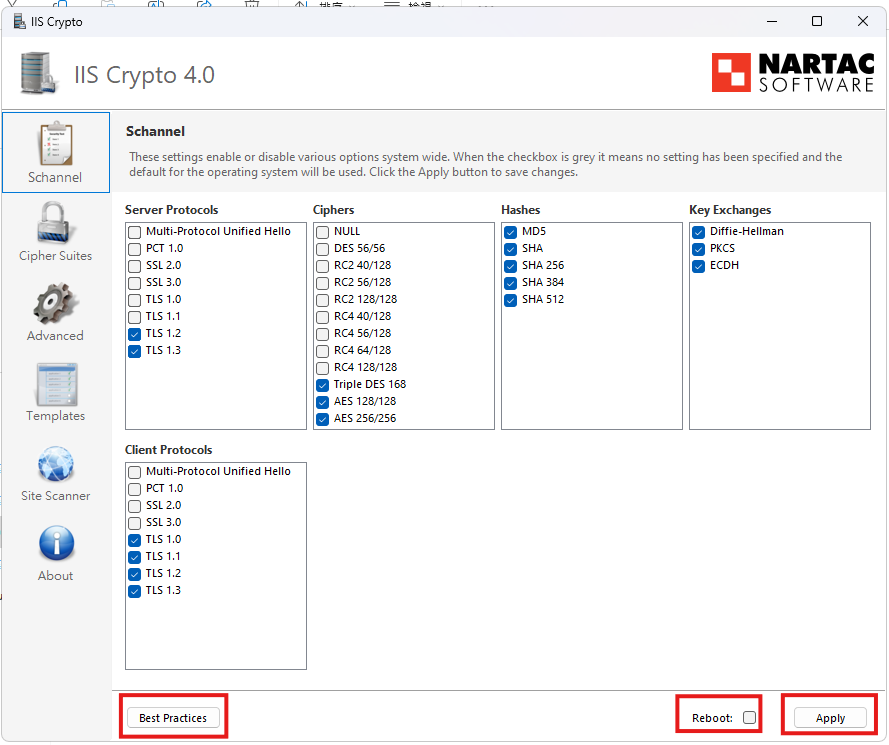
開啟程式後會顯示現在有使用的設定,Windows預設式全部開啟。
點下左下Best Practices會留下建議的設定,如果可以直接重開機點選reboot,再點擊apply。
[](https://book.4inlibra.com/uploads/images/gallery/2025-05/81wdmeLKxB.png)
備註:
1.推薦設定可能會導致舊OS的Client連不上(Server Protocols)或無法連上舊服務(Client Protocols),試需求自行調整。
2.如果不想使用應用程式想自己設定機碼,可以參考如下機碼修改路徑。
```
Windows Registry Editor Version 5.00
[HKEY_LOCAL_MACHINE\SYSTEM\CurrentControlSet\Control\SecurityProviders\SCHANNEL\Protocols]
[HKEY_LOCAL_MACHINE\SYSTEM\CurrentControlSet\Control\SecurityProviders\SCHANNEL\Protocols\SSL 2.0]
[HKEY_LOCAL_MACHINE\SYSTEM\CurrentControlSet\Control\SecurityProviders\SCHANNEL\Protocols\SSL 2.0\Client]
"DisabledByDefault"=dword:00000001
[HKEY_LOCAL_MACHINE\SYSTEM\CurrentControlSet\Control\SecurityProviders\SCHANNEL\Protocols\TLS 1.0]
[HKEY_LOCAL_MACHINE\SYSTEM\CurrentControlSet\Control\SecurityProviders\SCHANNEL\Protocols\TLS 1.0\Client]
"Enabled"=dword:00000000
[HKEY_LOCAL_MACHINE\SYSTEM\CurrentControlSet\Control\SecurityProviders\SCHANNEL\Protocols\TLS 1.0\Server]
"Enabled"=dword:00000000
[HKEY_LOCAL_MACHINE\SYSTEM\CurrentControlSet\Control\SecurityProviders\SCHANNEL\Protocols\TLS 1.1]
[HKEY_LOCAL_MACHINE\SYSTEM\CurrentControlSet\Control\SecurityProviders\SCHANNEL\Protocols\TLS 1.1\Client]
"DisabledByDefault"=dword:00000000
[HKEY_LOCAL_MACHINE\SYSTEM\CurrentControlSet\Control\SecurityProviders\SCHANNEL\Protocols\TLS 1.1\Server]
"DisabledByDefault"=dword:00000000
[HKEY_LOCAL_MACHINE\SYSTEM\CurrentControlSet\Control\SecurityProviders\SCHANNEL\Protocols\TLS 1.2]
[HKEY_LOCAL_MACHINE\SYSTEM\CurrentControlSet\Control\SecurityProviders\SCHANNEL\Protocols\TLS 1.2\Client]
"DisabledByDefault"=dword:00000000
[HKEY_LOCAL_MACHINE\SYSTEM\CurrentControlSet\Control\SecurityProviders\SCHANNEL\Protocols\TLS 1.2\Server]
"DisabledByDefault"=dword:00000000
```